Document Number: 40103-00313-00
Revision Date: 2024-06-19
Important Notice
This document contains proprietary and confidential information of Tecnar Automation Ltée.
Update Instructions
- Download the Update Package
- Download the .7z update package.
- Remember the location where the package is saved on your computer.
- Important: Do not try to open or unzip the package. It should be loaded directly into the Accuraspray software.
- Access the Accuraspray Software
- Open the Accuraspray software.
- Navigate to the “System Settings” tab.
- Load the Update Package
- In the “System Settings” tab, click on “Choose File.”
- Select the .7z update package.
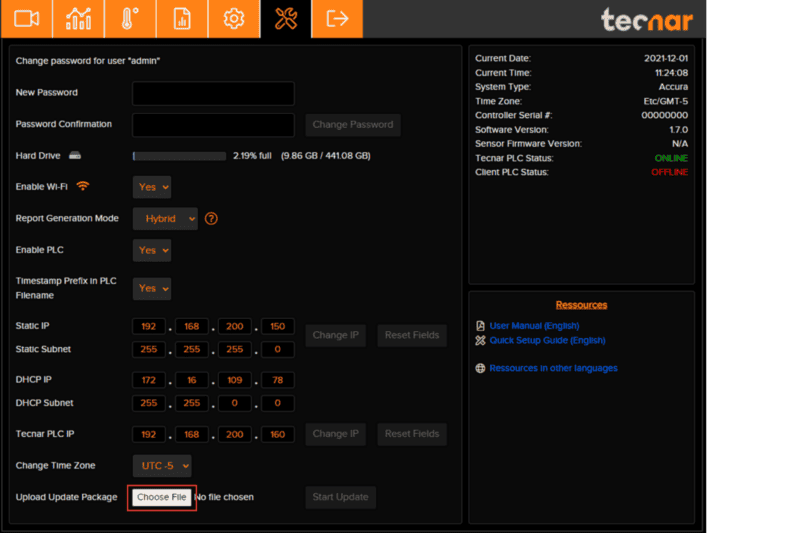
- Start the Update
- Click on “Start Update” to initiate the update process.
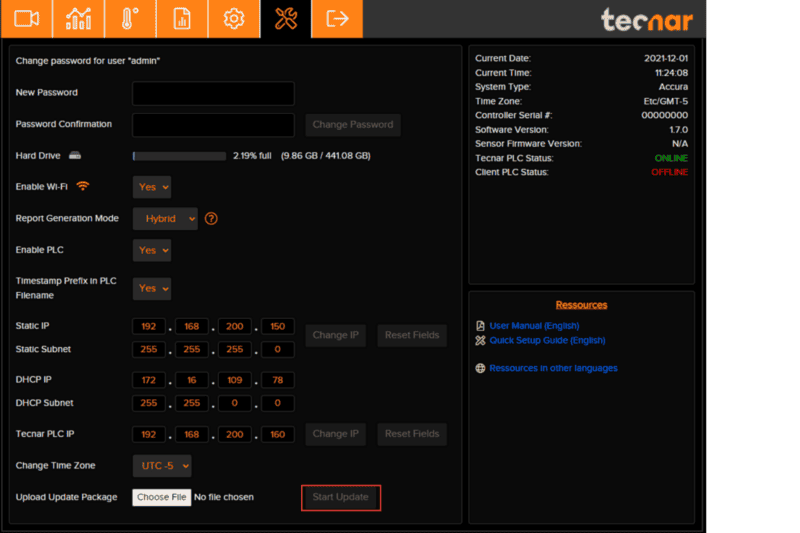
- Verify the Update
- After the update, return to the “System Settings” page.
- Ensure that the controller software has been successfully updated.